

Houdini-level cloth.
Right inside Blender.
Layered garments on fully animated characters, with contact and self-collision solved on the GPU. Set up, bake and review in your Blender scene.
Lace veil · simulation still
A dress over a petticoat. A hood against a moving neck. Lace a few millimetres from skin. Cloth neXt is built for the shots where garments touch the body and each other in every frame.
Where cloth gets difficult.
Layered garments. Moving bodies. Tight contact. The details that decide whether a shot holds up.
Cloth doesn't move alone.
Garments collide with the full animated body, with other garments and with themselves. You don't need to build a collision proxy by hand.
When a shot needs a faster solve, Character Cage generates an editable collider from per-bone hulls.
Contact and collisionsDifferent fabrics. Different behavior.
Start from one of 75 presets, from silk and knit to denim and leather. Refine stretch, bend and damping, then use Material Zones to override single regions of a garment.
MaterialsStay in control of the bake.
The Bake Companion shows the current frame, time remaining and CPU, RAM and VRAM load. If a long bake is interrupted, Cloth neXt offers to resume from a checkpoint once that checkpoint passes validation.
Baking and recoveryA tiered dress on a walking character
- LayersOverskirt and underskirt move as separate layers
- SleevesGathered sleeves follow the arm swing
- ContactSimulated against the complete animated body
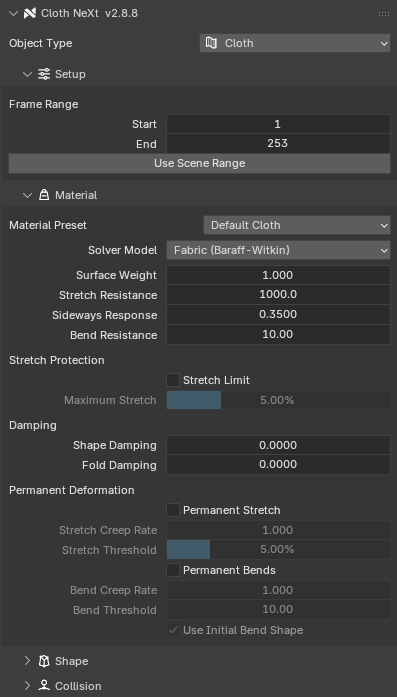
From mesh to motion. Without leaving Blender.
Set up your cloth, choose how it behaves, validate the scene and bake. It all happens in Blender's Physics properties.
- Assign a roleCloth, Collider, Cable, Soft Body or Rigid Body
- Pick a materialStart from a preset, tune what the shot needs
- ValidateScene Health flags problems before the bake
- BakeThe result plays back from cache in the timeline
Not only cloth.
Soft bodies, cables and rigid bodies take part in the same contact solve as your garments.
Built for the cloth you make today.
Exploring what it can become.
Cloth neXt 3.0 introduces two engines. AETHER, the Core Engine, is the unmodified PPF Contact Solver by ST Tech / ZOZO: cloth, contact, layered garments and soft bodies. GAIA, the Extended Engine, is the PolyWorks build of that solver, and it brings experimental fluid-driven cloth. FLIP Fluids moves the fabric; the fabric does not move the water.
AETHER and GAIA. The engines of Cloth neXt 3.0.
One add-on. Two licenses.
$19.99per user
Personal work, plus commercial work up to $1,000 a year.
$99per user
Unlimited commercial use for freelance, client and studio work.
Cloth neXt 3.0 is in final testing. A purchase on Superhive today delivers the current release.